

I have a confession. Over the past three years, my team and I have ordered roughly 140 desk gadgets from Amazon in the sub-$25 category. Most of them went back. Some went into a drawer of shame. A handful earned permanent spots on the desks in our test lab — and then migrated to my personal setup, which is the highest honor anything can achieve around here. What follows is the short list of survivors, the cheap plastic and aluminum that genuinely outperformed gear costing five times as much.
I’m not talking about novelty items or gag gifts. Every recommendation here solved a real annoyance I was dealing with daily. Some of them I didn’t even know I needed until I tried them. And every single one costs less than what you’d spend on lunch.
The Cable Management Awakening
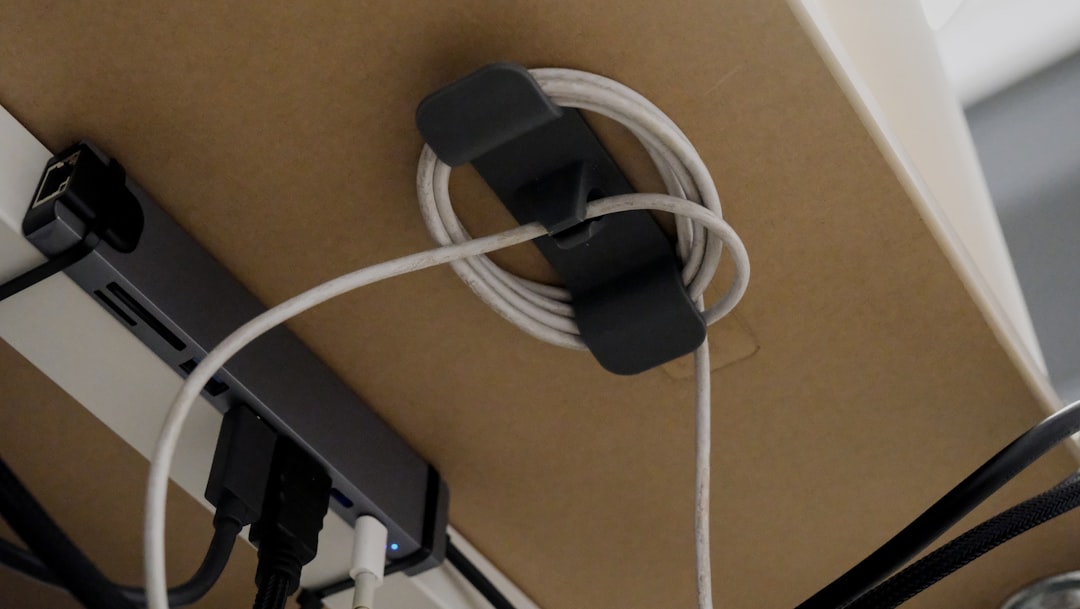
For years, the back of my desk looked like a plate of spilled spaghetti. Every time I swapped a keyboard or added a peripheral, I had to play a game of Twister under the desk, fishing through a tangle of USB cables, display cords, and power bricks. I kept telling myself I’d deal with it “eventually.” Eventually turned into never.
Then I installed an under-desk cable management tray and realized I’d been living like an animal. The specific one I use is a 25-inch no-drill model from Mzmaxy that clamps to the underside of any desk — including standing desks — without tools. It took about four minutes to install, and I’m not exaggerating when I say it changed how I feel about my entire workspace. Suddenly I could see the floor. Swapping cables became a 30-second task instead of a 20-minute ordeal.
At around $20, this is the single highest-impact desk upgrade you can make for the least money. I’ve since added a second one for the power strip zone. If you’re currently staring at a cable waterfall off the back of your desk, fix this first. Everything else in this article can wait.
Raising the Laptop to Eye Level
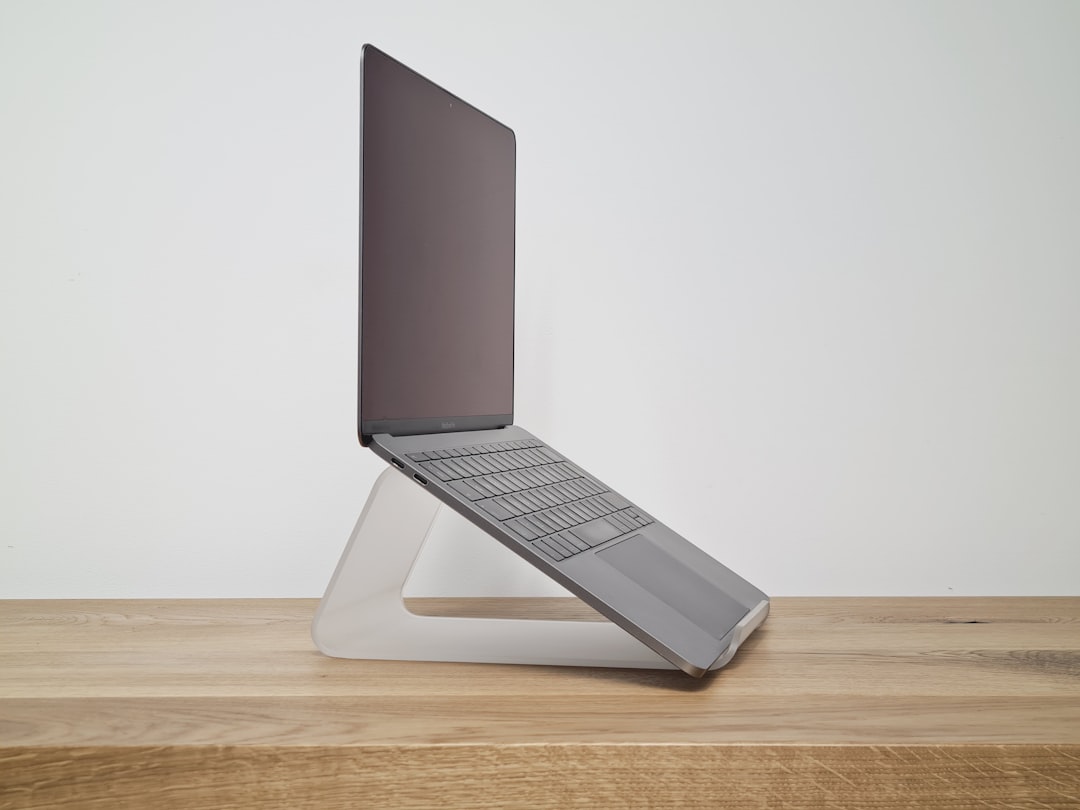
If you work on a laptop for more than two hours a day and it’s sitting flat on your desk, your neck is paying a tax you don’t even realize. I spent years with chronic neck stiffness before someone on my team handed me an adjustable aluminum laptop stand and told me to stop hunching. The Nulaxy stand I’ve been using folds flat, weighs almost nothing, and has enough ventilation channels to keep my MacBook from throttling during heavy workloads.
What I appreciate about this particular model is the dual-hinge design. It’s not just a fixed-angle wedge — you can dial in the exact height and tilt that works with your chair, your desk, and your monitor if you’re running a dual-screen setup. I’ve tested stands that cost $80 and didn’t offer this level of adjustability.
The real win here is pairing it with an external keyboard and mouse. Once your screen is at eye level and your arms are at a comfortable typing angle, you’ve essentially solved the ergonomic trifecta for under $25. If you want to go deeper on the display side, check out my monitor buying framework — it walks through how to pair a stand-mounted laptop with the right external display.
The Beverage Warmer That Actually Works

I’m going to level with you: I initially bought a mug warmer as a joke. It seemed like the kind of As-Seen-On-TV gadget that would end up in the junk drawer within a week. Instead, it became the most-used device on my desk. The House Gem model I landed on has four temperature settings and an auto shut-off timer, so my coffee stays at the exact temperature I want it for the full two hours it takes me to actually finish a cup.
Here’s why this matters more than you’d think. When you’re deep in a work session, you forget about the coffee. It goes cold. You take a sip, grimace, and either microwave it or pour it out and make a new one — both of which break your flow. A warmer sitting under your mug solves this completely. The 36-watt heating element gets hot enough to maintain temperature even in a cold office, and the little temperature display is genuinely useful for dialing in your preferred warmth.
At roughly $16-20 depending on the finish, it pays for itself in saved coffee within a month if you’re the type who pours out cold cups.
The Desk Mat That Ties Everything Together

A large desk mat is one of those things that seems frivolous until you use one for a week. Then you can’t go back. The KTRIO extended mat I’ve been rocking measures 31.5 by 11.8 inches — wide enough to span under both my keyboard and mouse with room to spare. The stitched edges prevent fraying, the rubber base keeps it planted, and the surface texture hits a sweet spot between speed and control for mouse tracking.
Beyond the mouse performance, a good desk mat absorbs sound. If you’re typing on a mechanical keyboard or doing a lot of mouse-intensive work, the mat dampens the click-clack that bounces off a hard desk surface. It also protects the desk itself from scratches, ring marks, and the general wear that accumulates over years of daily use.
I used to think desk mats were purely aesthetic. They’re not. They’re functional infrastructure that makes everything on your desk work slightly better and sound slightly quieter. At under $15 for the size I’m using, it’s a no-brainer.
Lighting That Doesn’t Create Screen Glare

Monitor light bars have become genuinely affordable, and the Quntis screen light bar I’ve been testing punches well above its price class. Unlike a desk lamp that throws light everywhere — including onto your screen, creating reflections — a light bar mounts on top of your monitor and directs illumination downward in a controlled asymmetric pattern. Your desk is lit. Your screen stays clean.
The Quntis model offers auto-dimming, three color temperatures, and touch controls. I keep it on the warmest setting during evening work sessions and the coolest setting during daytime hours to match ambient light. It draws power from a USB port on the back of my monitor, so there’s no extra power adapter eating up outlet space.
This pairs naturally with good ambient lighting. If your workspace needs a broader lighting overhaul, I wrote about my full desk lighting transformation a while back — the light bar is the final piece of that puzzle, handling the task-lighting layer without adding glare.
Wireless Charging Without the Eye-Sore

I’ve gone back and forth on wireless chargers for years. Most of them are slow, finicky about alignment, or look like they belong in a hospital. The INIU 15W wireless charging pad changed my stance. It’s slim, has a soft LED indicator that’s visible without being distracting, and charges my phone fast enough that I don’t reach for a cable anymore.
The trick is placement. I set it at the far corner of my desk, away from my mouse area but within arm’s reach. When I sit down to work, the phone goes on the pad. When I leave, it comes off — fully charged. It’s one of those habits that’s so frictionless it doesn’t feel like a deliberate action anymore.
If you want to take this further, there are desk mats with built-in wireless charging zones. I tested a few and found the charging was slower and the placement was fixed — if the charging spot didn’t line up with where I naturally set my phone, it was useless. A standalone pad gives you flexibility to position it wherever works for your specific setup.
The Mini Vacuum That Earned Its Keep

Keyboards are disgusting. After a few months of daily use, there’s enough crumb debris and dust under and between your keys to populate a small ecosystem. Compressed air pushes it around but doesn’t actually remove it. That’s where a mini desktop vacuum comes in.
The ODISTAR cordless mini vacuum I keep on my desk looks like a tiny robot — about the size of a computer mouse — and runs on a USB-rechargeable battery that lasts for weeks between charges. It won’t deep-clean a keyboard the way a specialized vacuum kit will, but for daily maintenance of crumbs, dust, and the occasional cookie fragment, it’s remarkably effective. I also use it on my desk mat, where it picks up the fine dust that accumulates in the fabric weave.
The surprise use case? It’s excellent for cleaning around the cable management tray I mentioned earlier. All those little dust bunnies that collect around power strips and cable runs get sucked right up. At around $13-16, it’s cheaper than most keyboard cleaning kits and far more convenient.
Desk Organization That Doesn’t Waste Space
A mesh desk organizer with multiple compartments and a small drawer seems like the most boring purchase you can make. I thought so too. Then I realized I was spending five minutes every morning hunting for the same three things: my SD card reader, a specific USB-C dongle, and a pair of earbuds. They were scattered across the desk, buried under papers, or knocked onto the floor.
The Marbrasse organizer I settled on has five mesh compartments in varying sizes plus a slide-out drawer. It’s not sexy, but it solved the morning hunt entirely. Everything has a home now. The top compartments hold the dongles and adapters I reach for daily. The drawer holds the smaller items that tend to disappear. The pen slots hold, well, pens — which I was somehow constantly losing despite owning approximately forty of them.
The real value isn’t the organizer itself. It’s the mental overhead it eliminates. When your gear has a designated spot, you stop thinking about where things are and start thinking about the work you’re trying to do. That’s worth $18 any day.
The Wrist Rest You’ve Been Putting Off
If you type for a living — and most of us do at this point — a keyboard and mouse wrist rest set is not optional. I ignored this advice for years because I thought my keyboard’s built-in wrist pad was sufficient. It wasn’t. The KTRIO memory foam set I eventually tried cost about $12 and immediately resolved the wrist soreness I’d been experiencing during long writing sessions.
Memory foam is the key here. It compresses where you need it to and springs back when you shift positions. The non-slip base keeps everything planted, even during aggressive mouse movements in games or design work. The set includes a keyboard wrist rest and a separate mouse pad wrist rest with built-in support, which ensures both wrists are elevated at the same angle.
I pair this with the laptop stand I mentioned earlier. Together, they create a full ergonomic chain: screen at eye level, shoulders relaxed, wrists supported, and arms at roughly 90 degrees. It’s the same posture a $600 ergonomic chair tries to achieve — and it cost me a total of about $35.
The USB Hub That Ended Port Jealousy
My laptop has exactly two USB-C ports. Between charging, external drives, my webcam, the light bar, and occasional peripheral connections, two ports is not enough. The ORICO clamp-mounted USB 3.0 hub bolted to the edge of my desk solved this permanently.
What makes this hub special is the clamp mounting system. Most USB hubs sit on your desk, taking up valuable real estate and sliding around when you plug things in. This one clamps to the desk edge, staying put while keeping four USB ports accessible right where you need them. The aluminum housing matches most modern desk setups, and the included 4.9-foot cable reaches to either side of a large desk with slack to spare.
If you’re running a lot of external devices — especially portable SSDs that need full USB 3.0 bandwidth — a powered hub is essential. The ORICO has an extra power supply port that ensures power-hungry devices don’t drop connections during data transfers. At around $20, it’s a fraction of what a Thunderbolt dock costs, and it handles 90% of what most people actually need.
The Philosophy of Cheap Done Right
Here’s what I’ve learned from testing hundreds of budget desk gadgets: price rarely predicts how much something will improve your daily experience. The cable management tray cost less than a pizza and did more for my productivity than any single upgrade I’ve made. The mug warmer is a $16 piece of plastic with a heating element, and I use it more than my $400 mechanical keyboard.
The trick is being honest about what actually annoys you. Not what looks cool in a YouTube desk tour. Not what the algorithm says you need. What annoys you, specifically, every single day. Cold coffee. Cable chaos. A phone that’s always dead. Wrists that ache by 3 PM. Every item on this list directly solves one of those problems.
I’m not suggesting you buy all ten at once. Start with the cable management tray if your desk is a disaster. Start with the laptop stand if your neck hurts. Start with the wrist rest if you’re feeling it in your joints. The beauty of sub-$25 gear is that the risk is almost zero — and the upside, when you find the right one, is a workspace that feels like yours instead of a temporary arrangement you’ve been tolerating for too long.
For the full ergonomic picture, I’d also recommend checking out my breakdown of automating your home office with smart plugs and my piece on AI-powered desk peripherals. Together with these budget picks, they form a complete workspace that handles everything from power management to video calls — without requiring a second mortgage.

One thought on “Ten Desk Gadgets Under $25 That Survived Three Years of Testing (And Earned Permanent Spots)”