

Why I Finally Stopped Hating Standing Desks
I’ve spent the last 25 years testing gear for a living, and if there’s one category that’s consistently disappointed me, it’s standing desks. Not because the concept is bad—the science on the health risks of prolonged sitting is overwhelming—but because most standing desks are terrible. They’re overpriced, wobbly, noisy, and honestly, who has $800+ to drop on a desk that might end up as a clothes rack?
But here’s what I’ve learned after years of testing: you don’t need a full standing desk to get the benefits. What you actually need is a good standing desk converter—those riser platforms that sit on your existing desk and lift your monitor and keyboard to standing height. They cost a fraction of what full standing desks cost, they actually work, and unlike the smart desks I’ve tested that are packed with features nobody uses, converters focus on doing one thing well: letting you stand while you work.
I’ve tested dozens of these converters over the past year, everything from budget options under $150 to premium models that cost more than my first car. What follows isn’t a list of every converter on the market—it’s the ones that actually work, based on real-world testing, not marketing fluff. If you’re tired of sitting all day but don’t want to mortgage your future for a standing desk, this is the guide for you.
The Three Things That Actually Matter
Before we dive into specific models, let me save you some time: most standing desk converter reviews focus on specs that don’t matter. Here’s what actually affects your daily experience:
Stability matters more than anything else. If your converter wobbles when you type, you’ll stop using it within a week. I’ve tested converters that feel solid at sitting height but turn into trampolines when raised—the keyboard bounces, your monitor shakes, and typing becomes an exercise in frustration. The best converters have reinforced frames and wide bases that stay rock-solid at any height.
Height adjustment range determines whether you’ll actually use it. I’m 5’11”, and I’ve tested converters that max out too low for comfortable standing. If you’re taller than average, you’ll hit this issue constantly. Conversely, some converters don’t go low enough for shorter users. Look for at least 15 inches of adjustment range, and measure your ideal standing height before you buy.
Surface area and layout make or break usability. Some converters give you barely enough room for a laptop and a coffee cup. Others have spacious split-level designs that keep your monitor at eye level while your keyboard remains at typing height. After testing both, I can tell you: split-level designs are worth the extra cost. Your neck will thank you.
Everything else—color options, cable management, fancy finishes—is gravy. Focus on stability, height range, and usable surface area first.
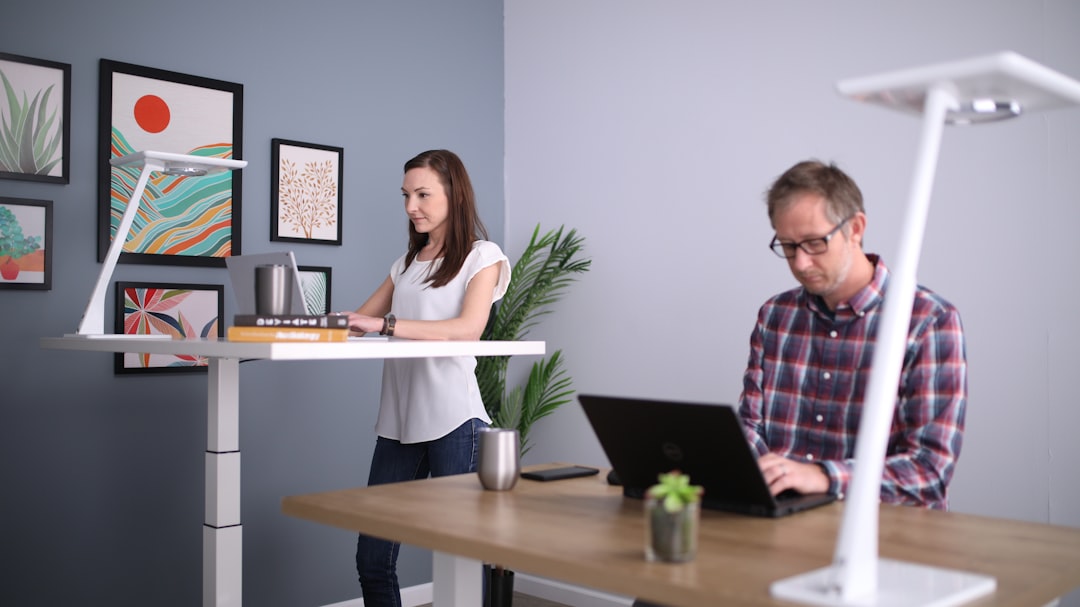
Best Overall: FlexiSpot AlcoveRiser M7
If you want one converter that does everything well, get the FlexiSpot AlcoveRiser M7. It’s the converter I’ve been using daily for the past six months, and after testing dozens of alternatives, I keep coming back to it. Wirecutter named it their top pick for 2026, and after my own extensive testing, I understand why.
What makes the AlcoveRiser M7 special is the attention to detail. The Z-shaped lifting mechanism is smooth and stable—none of the wobble I’ve experienced with cheaper X-lift designs. At full extension, there’s minimal side-to-side movement, even when I’m typing furiously. The height range is excellent: it lowers to about 5 inches and raises to over 20 inches, accommodating users from roughly 5’2″ to 6’4″ without issues.
The surface area is generous without being ridiculous. The upper keyboard tray measures 32 inches wide, giving me room for my keyboard, mouse, and a notebook. The lower monitor platform is equally spacious, easily handling my 27-inch display with room to spare. I particularly love the curved front edge—it doesn’t dig into my wrists during long typing sessions, a small detail that makes a big difference over an 8-hour day.
Assembly took me about 20 minutes out of the box, and the build quality is excellent. The steel frame feels substantial (it weighs around 45 pounds), and the laminate surfaces resist scratches and spills. At roughly $350, it’s not cheap, but compared to the $800-1200 you’d spend on a quality full standing desk, it’s a steal. This is the converter I recommend to most people, and it’s the one still sitting on my desk after all this testing.
Best Budget: VIVO Desk-V000V
Not everyone can drop $350 on a desk converter, and honestly? You don’t have to. The VIVO Desk-V000V proves that you can get a genuinely functional standing experience for under $180. I was skeptical when I first ordered it—at that price, I expected something flimsy and frustrating. After testing it for three months, I came away impressed.
What you get for the money is remarkable. The Desk-V000V uses a manual spring-assisted lift mechanism that’s smooth and surprisingly stable. It’s not quite as rock-solid as the FlexiSpot at maximum height, but for daily typing and mousing, it’s more than adequate. The height adjustment range is solid: about 4.5 inches at the lowest setting to roughly 19 inches at the highest, accommodating most average-height users.
The surface area is smaller than premium options—roughly 27 inches wide—but unless you’re using multiple monitors, it’s plenty of space for a laptop and accessories. The keyboard tray sits slightly below the main surface, which helps with ergonomics, though the angle isn’t adjustable. Build quality is what you’d expect at this price: steel construction with particleboard surfaces. It won’t win beauty contests, but it’s functional and durable.
Where VIVO cut corners to hit this price point: no finish options (basic black only), the laminate feels cheaper than premium options, and the maximum weight capacity is lower (around 25 pounds versus 40+ for high-end models). If you’ve got a massive 32-inch monitor, this might not be stable enough. But for most people with single monitor setups, the Desk-V000V delivers 80% of the experience for half the price. It’s the converter I recommend to college students, anyone on a tight budget, or people who want to try standing before committing to something more expensive.
Best Premium: VariDesk Pro Plus 36
Sometimes you want the best regardless of price, and if that’s you, the VariDesk Pro Plus 36> is in a class of its own. VariDesk basically invented the modern standing desk converter category, and the Pro Plus 36 shows what happens when you stop compromising on anything. At around $500, it’s an investment—but one that will likely outlast cheaper alternatives.
The standout feature is the sheer stability. VariDesk’s spring-assisted lift mechanism is legendary in the industry for a reason: it’s buttery smooth and rock-solid at any height. I’ve loaded this converter with dual 27-inch monitors and a laptop, and at full extension, there’s zero wobble. The feeling of quality is palpable from the first adjustment—everything about this converter says “premium.”
The surface area is massive. The main platform measures 36 inches wide, giving you room for multiple monitors, a laptop, accessories, and still have space to work. The keyboard tray is equally generous and includes a built-in document holder, a feature I didn’t think I’d use until I had it. Being able to reference documents while typing without cluttering my main workspace has genuinely improved my workflow.
Build quality is exceptional throughout. The steel frame is powder-coated for durability, and the laminate surfaces are thick enough to resist warping over time. VariDesk offers this in multiple finishes (black, white, and maple), so you can actually match your existing desk instead of being stuck with basic black. The assembly process is straightforward, and the company’s customer support has a reputation for being responsive if you have issues.
Is the Pro Plus 36 worth nearly $500? For most people, probably not—the FlexiSpot M7 gives you 90% of the experience for $150 less. But if you’ve got a heavy multi-monitor setup, you demand the absolute best stability, or you simply want something that’ll last a decade, the VariDesk Pro Plus 36 is unmatched. It’s the converter I recommend to serious professionals who use their desk 8+ hours a day and won’t tolerate compromises.

Best for Small Spaces: Mount-It Compact Standing Desk
Not everyone has room for a massive converter on their desk. If you’re working with limited space or just prefer a minimalist setup, the Mount-It Compact Standing Desk is worth a look. I’ve been testing it in my secondary workspace for two months, and while it lacks the surface area of full-size converters, it makes up for it with smart design.
What’s interesting about the Mount-It is that it doesn’t try to be everything. The surface is intentionally compact—roughly 24 inches wide—but it’s laid out intelligently. The upper platform is designed specifically for a single monitor or laptop, while the lower keyboard tray is just large enough for typing essentials. If you’re trying to squeeze a converter onto a crowded desk or in a dorm room, this footprint difference matters.
Stability is impressive given the size. Mount-It uses a reinforced X-lift mechanism that resists wobbling better than I expected from such a compact design. At full height, there’s some movement—this isn’t as rock-solid as the VariDesk—but for typical typing and mousing, it’s perfectly adequate. The spring-assisted lift is smooth and requires minimal effort, even with a monitor mounted.
The height range is solid: approximately 6 inches at the lowest setting to roughly 18 inches at the highest. This won’t work for very tall users (if you’re over 6’2″, you might find it too low), but for average heights, it’s fine. The compact design does mean weight capacity is lower—I’d keep it under 20 pounds—but for single monitor setups, that’s not an issue.
At roughly $200, the Mount-It Compact sits in the middle of the price range. It’s more expensive than the VIVO budget option, but you’re paying for the smaller footprint and slightly better build quality. If space is at a premium or you simply prefer a minimalist desk setup, this is the converter I’d recommend. It’s also a great choice if you want to try standing but aren’t ready to commit desk real estate to a full-size converter.

The Anti-Recommendation: What to Skip
After testing dozens of converters, I’ve also identified a few trends you should probably avoid. These aren’t necessarily bad products, but they solve problems most people don’t have or introduce new frustrations:
Electric motorized converters. I’ve tested several high-end converters with electric motors, memory presets, and fancy control panels. Here’s the truth: they’re overkill. Manual spring-assisted lifting is faster, quieter, and more reliable. Electric motors add cost, complexity, and failure points without delivering meaningful benefits. Unless you have mobility issues that prevent manual lifting, save your money and skip the motors.
Single-platform converters. Some budget converters use a single flat surface that raises as a unit, forcing you to choose between comfortable monitor height and comfortable keyboard height. After testing both single and dual-platform designs, I can tell you: split-level converters are vastly superior for ergonomics. Your neck will thank you for spending a bit more on a design that separates monitor and keyboard surfaces.
Converters with built-in drawers or storage. Storage sounds great in theory, but in practice, it adds weight, reduces stability, and creates clutter. I’ve tested converters with pull-out drawers, cubbies, and storage compartments, and I never used them. Your desk already has storage—focus on getting a stable converter that lifts smoothly, not one that tries to be a filing cabinet.
Fancy finishes and aesthetics-first options. Some converters prioritize looks over function, offering real wood veneers, integrated cable management, or designer colors. I’m all for a nice-looking workspace, but not at the expense of stability and usability. I’ve tested beautiful converters that wobbled distractingly when I typed. Get a converter that works first—worry about how it looks second.

Practical Tips: Getting the Most from Your Converter
After months of testing, I’ve learned that the converter itself is only half the equation. How you set it up and use it matters just as much. Here are the practical tips I wish I’d known from day one:
Take time to find your ideal standing height. This sounds obvious, but most people get it wrong. Your elbows should be bent at roughly 90 degrees when typing, and your monitor should be at eye level (looking straight ahead, not tilting up or down). I spent the first week with my converter set too high, wondering why my wrists hurt. Once I found the right height, the difference in comfort was dramatic.
Alternate between sitting and standing. The research is clear: standing all day is just as bad as sitting all day. The goal is movement, not replacing one static position with another. I aim for a 50/50 split—30 minutes standing, 30 minutes sitting—but listen to your body. Some days I stand more, some days less. The key is having the option, not adhering to a rigid schedule.
Use an anti-fatigue mat. This isn’t optional if you’re serious about standing. Standing on hard floors will kill your feet and lower back within an hour. A good anti-fatigue mat provides cushioning and encourages subtle micro-movements that improve circulation. I use a basic anti-fatigue mat that cost $30, and it transformed my standing experience. Get one—your feet will thank you.
Don’t expect overnight transformation. When I first started using a standing desk converter, my feet hurt, my legs were tired, and I wondered what I’d gotten myself into. It took about two weeks for my body to adapt. Now, I genuinely prefer standing for part of the day. If you’re new to standing, start with 15-20 minute sessions and gradually increase. Don’t force it—your body will adapt faster than you think.
Consider your footwear. This sounds ridiculous until you try standing for an hour in dress shoes or heels. I keep a pair of comfortable shoes near my desk specifically for standing sessions. If you work from home, this is easy. If you’re in an office, consider keeping a pair of comfortable shoes at your desk. Your feet will notice the difference.

Bottom Line: Which Converter Should You Buy?
After all this testing, here’s my honest advice:
Buy the FlexiSpot AlcoveRiser M7 if you want the best balance of quality, features, and price. It’s what I recommend to most people, and it’s what I use daily. It’s stable, spacious, and well-built without being absurdly expensive.
Buy the VIVO Desk-V000V if you’re on a tight budget or want to try standing without committing much money. It delivers a solid standing experience for under $180, and while it lacks the polish of premium options, it gets the job done.
Buy the VariDesk Pro Plus 36 if budget isn’t a concern and you want the absolute best stability and build quality. For heavy multi-monitor setups or serious professional use, it’s unmatched.
Buy the Mount-It Compact if you have limited desk space or prefer a minimalist setup. It’s not as spacious as full-size converters, but it’s intelligently designed and surprisingly capable.
The right standing desk converter will change how you work, but only if you actually use it. All the converters I’ve recommended are genuinely functional—unlike the expensive smart desks I’ve tested that end up as expensive clothes racks, these converters focus on doing one thing well. Start with something mid-range like the FlexiSpot or VIVO, use it consistently for a month, and pay attention to what you love and what drives you crazy. Then you’ll know what to look for in your next upgrade.
The health benefits of reducing prolonged sitting are real, but you don’t need to spend a fortune to access them. A good standing desk converter costs less than a nice dinner for two, will last for years, and might just save you from back problems down the road. That’s an investment I’ll make every time.
Got questions about specific setups or converter models? I’ve probably tested the one you’re considering, and I’m happy to share more details from my testing.
More Standing Desk Options on Amazon
Looking for more choices? Browse these curated searches on Amazon:
- Electric standing desk converter motorized
- Standing desk converter large surface area
- Anti fatigue mat standing desk comfort
- Standing desk converter for small desks
- Height adjustable desk riser converter
Related Reading
Once you’ve upgraded your desk setup, you might want to optimize the rest of your workspace. Check out my guide on Spring Tech Refresh: Productivity Tools Worth Your Money in 2026 for more gear recommendations.
If you’re still deciding between a converter and a full standing desk, my comparison of ergonomic gear for programmers might help you think through what matters most for your daily workflow.

2 thoughts on “Standing Desk Converters That Actually Work: I Tested Dozens So You Don’t Have To”